

Google is testing a new hub for business owners called Business Home, open for now only to businesses it invites by email in the US and the UK. It brings your Business Profile together with Merchant Center, YouTube and Google Ads, built with Google's Gemini AI models. Google calls it a closed beta for select business categories.
If you saw Business Home in a short video or a newsletter, opened business.google.com/home, and landed on a "coming soon" screen, nothing is wrong with your listing. That screen means Google has not invited your business yet. Your Business Profile keeps working, and Google says so directly: "You can also manage your Business Profile directly on Google Search and Maps."
Whether Business Home applies to you depends on a short list of conditions Google publishes, covered below. What matters first is a ten-minute check: sign in with the account that owns your profile, look for an invitation in your inbox, and confirm your hours, categories and photos are current.
Key Takeaways
Google describes Business Home as a closed beta experience, available only to select business categories in the US and the UK, as of November 15, 2026.
An eligible business receives an email, and the button to select reads "View your business home."
It means Business Home is not available to your business yet, and your Business Profile keeps working on Search and Maps.
Google's pages name Business Profile, Merchant Center, YouTube and Google Ads as the connected tools.
Sign in with the right Google Account, search your inbox and spam for an invitation, and keep your hours, categories, photos and reviews current.
Business Home is Google's invite-only hub, and your Business Profile works without it
Google describes Business Home as "a growth partner built with Gemini models that connects your essential business tools." In plain terms, it is one place where a business can handle its Google listing and the other Google products it uses, with AI help for writing posts, making images and deciding what to do next.
It is not open to the public yet. Google's About the Business Home beta page says it is a closed beta experience, and Google gives no date for wider access. Search Engine Roundtable reported the rollout on October 22, 2026, including the invitation email that eligible businesses receive.
That is why a business can read about Business Home everywhere and still see a "coming soon" screen. The product exists; your business has not been let in.
Meanwhile, nothing about your daily Google work has been taken away. Hours, categories, photos, posts and reviews are managed on Search and Maps the way they were last month. If you are not invited, you are not behind on anything Google requires.
Business Home gathers four Google tools and adds AI help on top
Google lists four connected tools: Business Profile, Merchant Center, YouTube and Google Ads. In the product's Settings, under Connected tools, an invited user can switch each connection on or off, and needs the matching permissions for each tool. Those four are the connected tools Google names. Google Analytics, Search Console, Gmail and Calendar, which some social videos mention, are not on Google's list.
The beta features Google lists today fall into four groups:
- Content and photos: AI content generation and studio-quality photo tools, in a part of the product called Creative lab.
- Locations: managing business details such as hours, and replying to reviews.
- Growth guidance: proactive suggestions for what to do next.
- Customer messaging: AI-powered messaging with RCS for Business, a richer form of text messaging.
Creative lab studies your Business Profile, brand styles and images to make social updates, seasonal promotions and visual assets, and it can post to your Business Profile with one click. Google's Creative lab page says you must follow Google's Generative AI Prohibited Use Policy, and that deleting an asset in Creative lab does not delete it from your Business Profile or connected accounts.
Reviews and messages are part of Business Home too. If those are what you want to manage, our posts on Google's AI replies to customer messages and on where to see all of your Google reviews cover how they work on the Business Profile today.
Google lists seven conditions for who can get Business Home
Google publishes a list of conditions for the beta. The wording below follows Google's About the Business Home beta page, checked November 15, 2026.
| Condition | What Google lists |
|---|---|
| Account | An active Google Account |
| Country | A business based in the US or UK |
| Role | Owner or manager of a verified Google Business Profile |
| Size | Under 10 locations for the same business |
| Business type | Owns or manages only one type of business |
| Linked accounts | At most one YouTube channel, one Google Ads account and one Merchant Center account |
| Policies | Account and business follow all applicable Google policies |
Google gives an example for the business type line: owning both a restaurant and a retail shop is not supported. Treat that as Google's example, not a full rule list.
Meeting every condition does not put you in. The beta is also limited to select business categories, and Google gives no list of which categories those are. Lists of eligible categories on other websites are not Google's, so leave them out of your planning. The conditions tell you what to have in order; the invitation tells you whether Google has opened the door to your business.
The invitation arrives by email, and the coming soon screen means yours has not come yet
Google describes one route in. In its words: "If your business is eligible for the Business Home beta, you will receive an email inviting you to Business Home. From the email, select View your business home to get started."
The invitation is the way in. The entry link at business.google.com/create?flow_id=bh does not guarantee access, and opening it puts your business on no list. If a video or a vendor promises to get you admitted, Google has made no such promise.
What you see without an invitation is a sign-in screen with the heading "Business Home coming soon to you." Underneath it says: "Business Home is not available to your business yet. You'll get an email at your business profile email address as access expands." A line below that adds: "If you received an invitation by email, Sign in with the invited email."
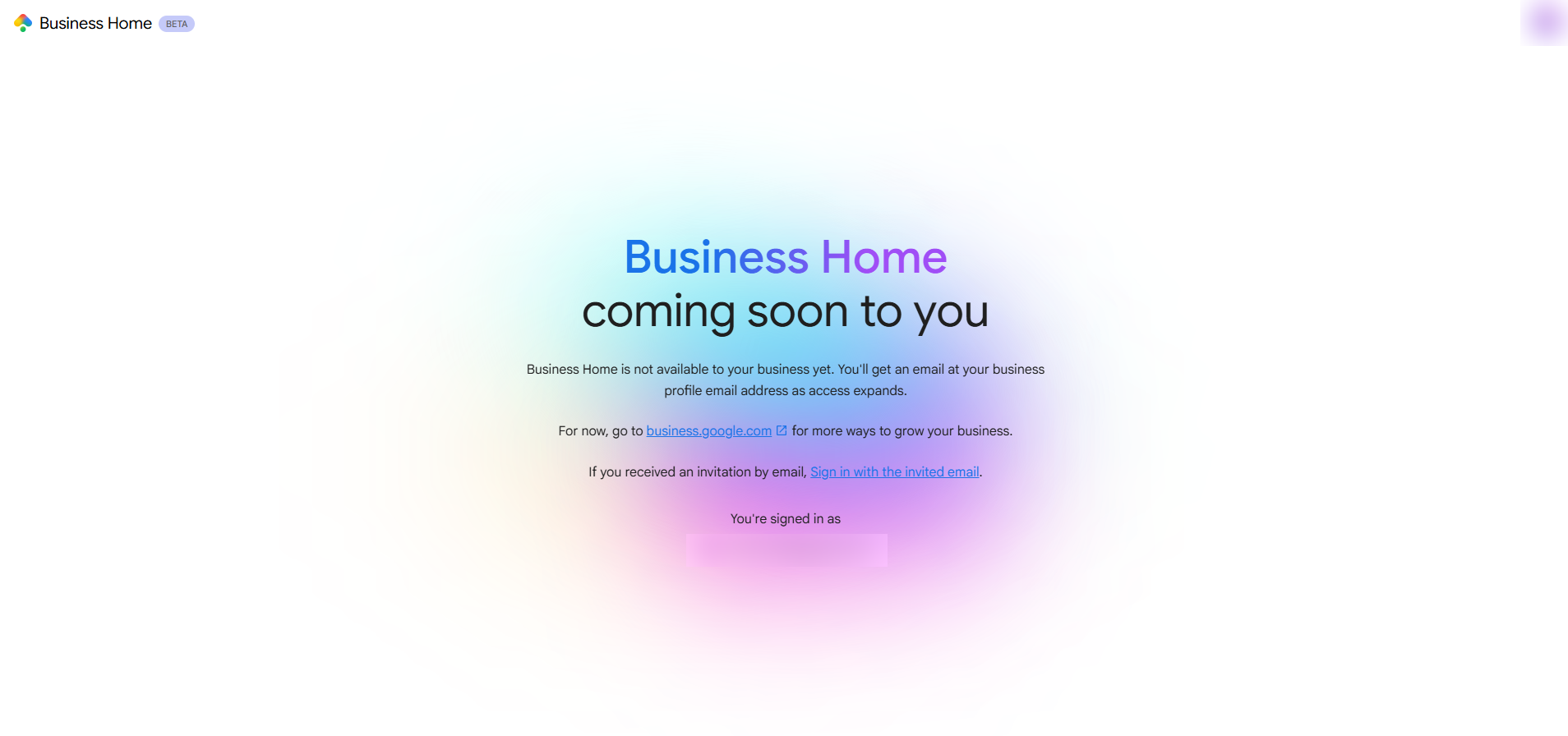
The screen and Google's help pages say the same thing: access is by invitation, and the email goes to the business profile's email address. So, the address that owns your Business Profile is the one to watch.
A ten-minute check shows where you stand
You can run this check yourself, tonight or this week, without paying anyone. It tells you whether you are invited, whether you could be, and whether your profile is in shape either way.
The ten-minute Business Home check
Use the Google Account that owns or manages your verified Business Profile, not a personal account that has no role on it.
Business Home may open, or it may show the "coming soon" screen. Write down which one.
Check your Inbox, Promotions, Updates and Spam for an email from Google about Business Home.
Google's eligibility list requires a verified Business Profile with an owner or manager role.
Look over your hours, categories, phone number, website and photos on Search or Maps, and fix whatever is out of date.
If Business Home is not available to you, the last step still pays off, because customers are reading your listing today. Open your profile on Search or Maps and keep working there. The Performance report on your profile still shows the calls, website visits and other actions customers take.
If you find a problem, the common ones come down to a handful of causes. You may be signed in with the wrong account. Your profile may not be verified. You may hold a viewer role instead of owner or manager. Your business may have 10 or more locations, or more than one linked YouTube, Ads or Merchant Center account. A connected product may have its own policy or billing problem. Several of these can be fixed in your own accounts; others, such as consolidating accounts, change how the business is set up and deserve care.
Your hours, categories, photos and reviews stay in your hands on Search and Maps
Business Home is an additional place to manage a profile, not a replacement for the places you use now. Google's page on managing your Business Profile in Business Home says you can manage profiles there "in many of the same ways as you already do on Search and Maps": business info, category features such as menus, inventory and services, photos and videos, reviews and messages. It adds that certain features may not be available to all businesses.

So, the work that keeps customers coming does not wait for an invitation. Answer reviews the day they arrive. Keep holiday hours accurate. Add recent photos of the shop, the truck or the finished job. If customers write to you through Maps, our post on messaging a business from Google Maps explains what that looks like from both sides.
When you do get an invitation, a profile that is already accurate makes the first week simple. Business Home draws on your Business Profile, your brand styles and images, and any accounts you connect, so accurate details and good photos give it better material to work from. Review anything the AI drafts before it goes live, the same as you would for a new hire's first post.
Business Home has no separate listed price, and Google makes no ranking claim for it
Google lists no separate price for Business Home. Ads spend through a connected Google Ads account is a separate cost. Confirm anything that touches billing inside your own accounts before you rely on it.
Rankings are the question people ask next, and Google's Business Home pages do not mention rankings. The pages describe a hub with tools and guidance, not a way to move up in local results. If you want to know how your listing performs, the Performance report on your Business Profile shows customer actions today, and our local SEO work looks at how customers find you across Search and Maps.
That also means no one can sell you a better position through Business Home. Access is decided by Google's invitation process, not by a vendor, a payment or a tool.
Some problems are worth handing off, and checking your access is not one of them
You can check Business Home access yourself in about ten minutes, and that check comes first. A vendor cannot force admission to a closed beta and cannot promise a ranking benefit from it. Paying for either would be paying for something nobody outside Google controls.
Help earns its place when the Business Profile underneath needs work. That includes verifying the profile, repairing ownership or permissions when the wrong account or a missing role is the problem, keeping hours, details and photos current, answering reviews and posting on a schedule, checking the status of a connected Ads, Merchant Center or YouTube account, and measuring the calls, website visits and bookings that result.
If your invitation never comes, that is not a failing on your part, and it is not a reason to rebuild your Google presence around a product you cannot open. If it does come, a profile with its permissions and linked accounts already in order makes the first week easier.
Plan around what Google has stated so far
Details can change while Google tests Business Home, and Google's Business Home Help Center lists the current conditions. The details in this post are current as of November 15, 2026.
For now, plan around what Google has stated: select business categories, the US and the UK, and an invitation by email. Google gives no category list and no date for wider access, so a category list or a launch date from anywhere else is not Google's. Wait for the email rather than a workaround.
If you manage more than one business, remember the limits in Google's list: one type of business, under 10 locations, and one linked YouTube channel, Google Ads account and Merchant Center account. A business that fits those limits has the best chance of working smoothly when its turn comes.
Do you know where you stand with Business Home?
Pick an answer to begin.
1. You open business.google.com/home and see "Business Home coming soon to you." What does that mean?
2. How does Google say eligible businesses get into the Business Home beta?
3. Which tools does Google's Business Home page name as connected?
Frequently Asked Questions About Google Business Home
What is Google Business Home?
It is a closed beta hub from Google that connects a business's Business Profile with Merchant Center, YouTube and Google Ads, built with Gemini models. As of November 15, 2026, it is limited to select business categories in the US and the UK.
How do I get invited to Google Business Home?
Google says eligible businesses receive an email inviting them to Business Home, with a "View your business home" button to start. Sign in with the Google Account that owns your verified Business Profile, and check Inbox, Promotions, Updates and Spam for the message.
Why does Google Business Home say coming soon?
The screen says Business Home is not available to your business yet, and that you will get an email at your business profile email address as access expands. Your Business Profile is working as usual.
Does Business Home replace my Google Business Profile?
Google says you can manage your Business Profile directly on Google Search and Maps, and its pages describe Business Home as another place to manage it. Your hours, photos, posts and reviews work there as they did before.
Is Google Business Home free?
Google lists no separate price for Business Home. Spend on Google Ads, if you connect an Ads account, is a separate cost, so confirm billing in your own accounts.
Will Business Home help my Google Maps ranking?
Google's Business Home pages do not mention rankings. Keep your hours, categories, photos and reviews current on Search and Maps, since customers see that listing today.
Final Thoughts
Business Home is Google's closed beta hub for the Business Profile, Merchant Center, YouTube and Google Ads, offered by email invitation to select businesses in the US and the UK. A "coming soon" screen means your business has not been invited, and your Business Profile keeps working on Search and Maps. Your first moves are the ten-minute check and a profile that is accurate.
Hours, categories, photos, posts and reviews are managed without Business Home, and a listing you maintain now is the same one Business Home will draw on if your invitation arrives. That work counts at every stage of Google's rollout.
If you want a second set of eyes on your profile, Web Leveling can check ownership, permissions, verification and upkeep with you, and our Google Business Profile management keeps your details, photos and reviews current. If the answer is that you can handle the access check yourself, we will say so. We work with small and medium businesses across the country and overseas. Tell us what your Google listing is doing right now, and we will help you sort out what to do first.
Terms
Business Home words in this post
Tap a term to see what it means.
Business Home. Google's closed beta hub that connects a Business Profile with Merchant Center, YouTube and Google Ads.
Business Profile. A business's free listing on Google Search and Maps.
Closed beta. A test that only invited users can enter.
Creative lab. The part of Business Home that makes social updates, promotions and images from your profile and brand styles.
Merchant Center. Google's tool for managing product listings.
RCS for Business. A richer form of text messaging that businesses can use to talk with customers.
Gemini. Google's family of AI models that Business Home is built with.