Your phone is full of finished jobs. The deck that was gray and is now deep brown. The kitchen that was bare studs. The yard that went from mud to lawn. The work is good, but a visitor to your site cannot see any of it, and you are not sure which photos to use or whether you are even allowed to post a customer's house.
Before and after photos on a business website work when they show one real job, shot from the same spot, with a short caption and the customer's written okay. That is the whole recipe. Each part has a small step, and none of them need a new camera.
Start with a single job, not a gallery. One pair that passes every check does more for a visitor than a gallery of photos that do not.
Key Takeaways
Shoot the after from the exact position of the before, with a fixed reference point like a fence, door or driveway kept in frame.
Get the property owner's signed okay that names the photos, the places they may appear, and how to withdraw consent.
Crop or blur faces, house numbers, mail, plates and neighbors' property unless permission covers them.
Stack the pair with visible Before and After labels and a caption, and treat a slider as an optional extra.
How do I show one job so a visitor believes it?
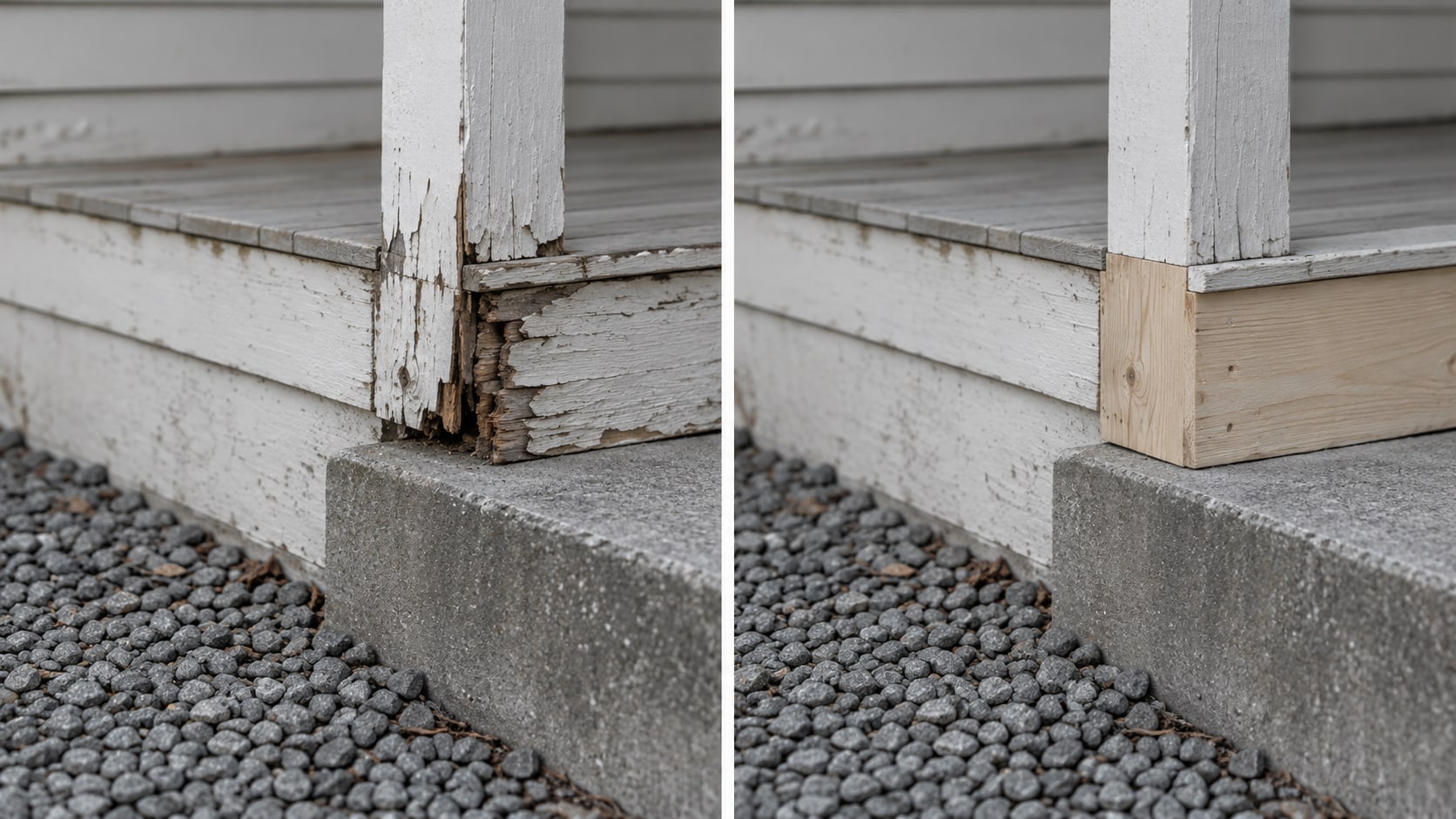
Use real photos of the same completed job, taken from the same spot before and after the work, and show them as a matching pair with a short caption. A visitor who sees the same corner of the same yard, with the same fence behind it, can tell what changed without being told.
Each pair needs four things: the before photo, the after photo, a caption that names the service and date, and a record that you have permission to publish it. If one of the four is missing, hold the pair back until you have it.
Never use stock images, staged setups or retouched shots as results. If you have no true matching before, label the final photo as a project photo. Do not invent a comparison. If you want a closer look at why real work photos earn more trust than stock, the post on stock photos or real photos on your website covers it.
How do I take the after photo from the same spot as the before?
Think of the first photo as a marker you have to return to. Before work starts, pick a spot you can find again, such as a point against a wall or a line on the ground. Note the camera height, how far you stood, and which way you faced. The Copyright Office describes the photographer as the person who generally owns the photo, so the one holding the camera on your crew should be the same person each time, or the photos should be assigned to the business in writing.
Keep a fixed reference point in the frame, like a fence, a door, a driveway edge or a window. That anchor is what lets a stranger see that both photos show the same place. Shoot in similar light and weather when you can, and clear debris and temporary materials before the final shot so the finished work is what shows.
Record the job name or internal job number, the date, the service performed, and who took each photo. That record is what you will point to later if anyone asks where a photo came from.
Do I need permission to post a customer's home?
Get written permission from the property owner or customer before you publish. A text message that says "sure" is a start, but a short signed note is better because it can name exactly what the customer agreed to. A tenant, an employee or the photographer alone cannot give permission for something another person owns.
The U.S. Copyright Office explains in its photography guidance that the photographer generally owns the copyright, while the people or property shown may have separate privacy, publicity or contract interests. In plain terms, taking the photo does not give you every right to publish it.
A useful permission note covers these points:
- The photos: Name or attach the specific before and after images.
- Where they may appear: Website, social media, Google Business Profile and advertising, each listed.
- What may show: Whether the customer's name, testimonial, face and property may appear.
- How to withdraw: How the customer can ask you to stop using the photos in the future.
State publicity and privacy rules differ, and a job with an unusual twist may call for a quick word with a lawyer in your state. If permission is missing, ask the customer before you publish. If they say no, leave the pair out.
What should I crop or blur before it goes live?
Look at the full-size file, not the thumbnail. Crop or blur faces, house numbers, street signs, mail, children, documents, license plates, security details and anything that shows a neighbor's property. The only exception is something the photo truly needs and that the customer's permission covers.
Blurring a face does not settle every privacy question, so the cleaner choice is to frame it out. When who lives there does not matter to the result, a close detail shot of the new tile, the stained boards or the finished edge shows the work without showing the home.
Do this before upload. A hidden detail that you meant to blur but only covered in a layout is still in the file.
What does the FTC expect from a before-and-after image?
The FTC's advertising guidance expects the image to be truthful and not materially altered, and the claim a customer would take from the whole page must be supported. Cropping for size and balancing the exposure are fine when the result still looks the way it looked on the job. Removing a stain in an editor is not.
One real job also does not show what the next customer will get. The FTC says that if an endorsement does not reflect what customers generally can expect, the ad needs to say clearly what they can expect. A "Results may vary" line by itself is not enough. Keep the caption specific to the job shown, and do not suggest that every job will look the same.
If a customer's quote sits next to the pair, the FTC's Endorsement Guides, revised in 2023 apply online, including websites, reviews and social media. The quote has to reflect that person's real experience, and any material connection, such as a discount for posting, has to be disclosed. Do not attach a photo to a public review just because the review is public. The customer needs to have agreed to both.
A pair also does not prove that your service caused every visible change. Light, weather and cleanup can change how a space looks, which is why the same-spot rule matters.
How should the pair look on a phone?
Stack the two photos, Before on top and After below, each with a visible label and the same information repeated in text. On a wide screen, put them side by side. Either way, a visitor should be able to read the result without dragging, tapping or zooming.
A slider is an optional extra. The pair has to make sense without it, and a slider should never be the only way to read the result. Choose the layout that stays clear, accessible and quick on the phone in someone's hand.
| Part | What to include | Why it helps |
|---|---|---|
| Labels | Visible Before and After text on each photo | A visitor knows which is which at a glance |
| Order | Before above After on a phone, side by side on wide screens | No dragging or guessing |
| Caption | Service, general place, date, scope and any limit | The pair reads as a record of real work |
| Text version | The same information in plain text under the pair | Works for screen readers and slow connections |
| Slider | Optional, with the stacked pair still visible | Never the only way to see the result |
Load speed matters here, too. Google and web.dev advise lazy-loading images below the first screen, but not the main image a visitor needs right away. They also advise sending appropriately sized, compressed copies, with your originals stored separately. Our post on how to resize and compress images for your website walks through the steps.
What should the caption and alt text say?
Write the caption for a visitor and the alt text for someone who cannot see the photo. They do different jobs, and neither is a place to stuff keywords.
A good caption names the service, the general place, the date or time period, the scope or materials where they matter, and any limit that changes how the result should be read. A caption for a deck job might read: "Deck cleaning and staining, completed June 2026. Photos taken from the same position before work and after the stain cured."
Alt text describes what the image shows. Google's image guidance asks for descriptive filenames, captions and alt text, placed near relevant text, without repeated keywords. WCAG 2.2 Success Criterion 1.1.1 asks for a text alternative for meaningful images, which is the reason a before-and-after pair needs one that says what changed. Our post on alt text for a small business website has examples.
When the pair belongs in a longer project write-up, with scope, process and customer comments, content marketing is the work that turns single photos into pages people read.
Can the same photos go on my Google Business Profile?
Yes, when they accurately represent your business and meet Google's photo rules. The Business Profile photo guidance asks for photos that are in focus, well lit and minimally altered. Google lists JPG and PNG formats, a recommended size of 720 by 720 pixels, a 250 by 250 pixel minimum, and a file size from 10 KB to 5 MB.
Your permission note should name Google Business Profile as a channel before you post there. The same approved photo can then sit in several places: a project page with the full pair and job details, the matching service page, a Business Profile update, and a social post. Keep a simple record that links each photo to its permission and publication date.
What is the ten-minute check for one recent job?
Pick your best recent job, open the earliest usable photo and the final one, and ask these questions.
- Same area: Do both photos show the same place from a close enough position?
- Clear change: Can a stranger see what changed without zooming?
- Finished work: Does the final image show the completed job, not an unfinished stage?
- Known facts: Do you know the job date and the scope?
- Permission: Do you have written permission for website and marketing use?
- Privacy: Are faces, addresses, plates and personal items protected?
- Phone: Does the pair read comfortably on a phone?
If every answer is yes, put that one pair on the most relevant service or project page before you build a large gallery. Then ask someone who does not know the job what they think changed. If they cannot tell, reshoot or choose a different job.
A better camera does not fix weak proof. Position, light, timing, a clean final shot, permission and a clear caption come first. A pair that is misleading, or that you do not have permission for, should stay off the site.
When is paid help worth it?
You can often fix your first pair alone in an afternoon. Paid help starts to make sense when the problem is repeating it: dozens of scattered images, no permission routine, a gallery that is slow or hard to use on a phone, or nobody to keep the evidence current.
The value of that help is organization, judgment and upkeep. That means a capture and approval routine, image files prepared for speed and access, a project layout that holds up, and examples connected to the service pages they belong on. It does not mean a promise that a slider or redesign will bring in leads, and it cannot turn a missing or misleading result into real proof. If you want to see whether the page itself is turning visitors into inquiries, conversion rate optimization is the work for that.
Is your before-and-after pair ready to publish?
Pick an answer to begin.
1. Where should you stand to take the after photo?
2. Which is enough permission to post a customer's home?
3. How should a slider be used on a phone page?
Frequently Asked Questions About Before-and-After Photos
Do before-and-after photos need to be taken from the same angle?
Yes. Use the same position, height, orientation and distance, with similar light, so the difference visitors see comes from the work and not from the camera.
Do I need permission to publish a customer's home?
Get written permission before using identifiable customer property in website or advertising content. The note should say where the photos may appear.
Can I use a customer's face in a project photo?
Only when permission covers the person's likeness and advertising use. If the face is not needed, crop or blur it.
Should I use a slider or side-by-side images?
Start with stacked or side-by-side images that make sense without interaction. A slider can be an optional extra.
What should the caption include?
The service, scope, general place, date or time period, and any limit that changes how the result should be read.
Can I edit the photos?
Cropping, exposure balancing and compression are fine when they do not change the apparent result. Do not fake, retouch or remove anything that affects the result.
The Bottom Line
A believable pair comes from one real job, shot from the same spot, with a clear caption and the customer's written permission. Private details are protected, the Before and After labels are visible, and the page reads well on a phone. One pair also does not prove what the next customer will get, so the caption stays specific to the job shown.
Doing this once gives you a repeatable routine. The next job starts with a marked spot and a release, and the finished pair goes on a service page with a record behind it.
If your photos are scattered, your permissions are in text threads, or your gallery is slow on a phone, Web Leveling can help. Our web design work builds project pages that show real jobs clearly and are easy for you to keep current. We work with small and medium businesses across the country and overseas. Contact us about your project photos and we will look at what you have.
Terms
Photo proof words in this post
Tap a term to see what it means.
Matching pair. Two photos of the same area of the same job, taken from the same spot before and after the work.
Reference point. A fixed object, such as a fence, door or driveway edge, kept in both photos to show they match.
Release. A written note from the property owner or customer that lets you publish the photos.
Alt text. A short written description of an image for people who cannot see it.
Lazy loading. Delaying the loading of images below the first screen so the page opens faster.
Slider. A control a visitor drags to reveal the before and after of one image.